
Don't Let Summer Break Patient Adherence: How to Turn Q3 Check-Ins Into Real Revenue





Summer breaks can often affect patients’ daily routines, and that has a direct effect on whether they stay on therapy. Vacations, travel, and extraordinary circumstances push refills past their due dates. A refill that would normally happen on time slips by a few days, then a couple of weeks. Multiply that across a patient panel and PDC (proportion of days covered) quietly drifts below the 80% year-end goal before anyone notices.
That's exactly why payer programs build a dedicated quarter three check-in window, running July through September, right into the calendar. Midyear is statistically when adherence is most likely to lapse and it's also where a lot of dollar opportunities are sitting right now, waiting to be worked.
The Cost of Waiting
Without proactive outreach, refills slip past their due dates unnoticed. If gaps aren’t caught and documented, your pharmacy can miss out on that revenue. By the time it shows up as a year-end miss, the opportunity has already expired.
With EQUIPP®, weekly workflows surface those gaps before they pile up. Quarterly check-ins keep PDC on track throughout the year instead of leaving it to a year-end scramble, and every documented intervention converts directly into payment. An unmanaged summer lapse doesn't have to become a Q4 problem. It just requires staying active on the platform.
Where to Look: The EQUIPP Dashboard and Notifications
One of the most important habits a pharmacy team can build is checking the target list every Friday. It is important to visit the Enhanced Services tab for a refreshed targeted patient list designated by program. Make this your pharmacy team’s to do list and filter by date as many opportunities are time sensitive by design.
The dashboard is built to move a patient from opportunity to payment in four steps:
- Identify – Enhanced Services refreshes targeted patient lists every Friday across LAMP, CBP, and check-in programs.
- Engage – Pharmacists work the list at the counter using EQUIPP or the EQUIPP Copilot™ flyout, right inside their normal workflow.
- Document – Interventions get logged directly in the EQUIPP dashboard, satisfying the payer's validation requirements.
- Get paid – Once PQS receives funds from the health plan, payment flows through to the pharmacy.
The new Enhanced Services dashboard, accessible from the bullseye icon, shows what's been earned year to date, what's still available to earn, and how many dollars have already been missed to expired opportunities. Both Controlling Blood Pressure (CBP) and Longitudinal Adherence Monitoring Program (LAMP) opportunities are visible from the same screen.
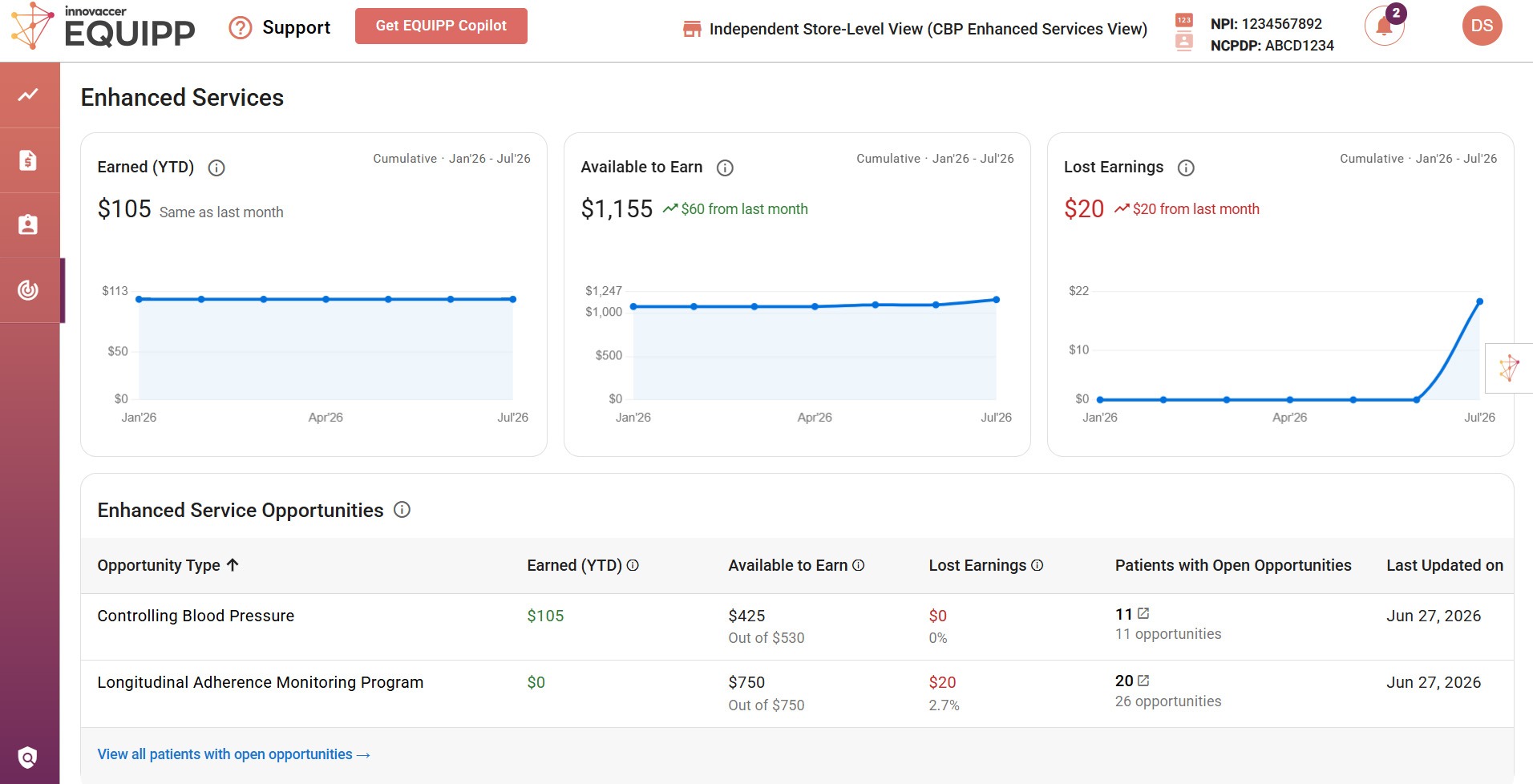
Don’t miss notifications! The orange bell in the top right corner is worth a second look too. It flags unread notifications tied to new Enhanced Services opportunities and the dollar amounts attached to them. Skip the bell, and it's easy to sit on opportunities without knowing they exist.
Q3 Check-Ins: Where the Dollars Are Right Now
PQS adherence programs in EQUIPP pay pharmacies for keeping patients adherent all year, built around core PDC measures for diabetes, RASA, and cholesterol. Each needs to reach 80% or higher by year end.
Receive payments for:
- Quarterly check-ins: Programs may offer up to three check-ins per patient measure, one per quarter (Q2: April–June, Q3: July–September, Q4: October–December), plus on-time fill bonuses once unlocked.
- New for 2026! Look out for gap closure payments for Statin Therapy for Patients with Diabetes (SPD and Asthma).
Q3 check-ins are specifically designed to close the gaps that tend to open right when summer starts. The flow is simple:
- Log in to the EQUIPP dashboard to see pending Q3 opportunities.
- Identify patients with outstanding Q3 check-ins, paying close attention to expiration dates.
- Complete each check-in before it expires on September 30. That date is firm.
- Refill the linked prescription before the intervention end date to unlock the payment.
Miss any one of those steps and the opportunity can expire before the pharmacy gets credit for it. The all-patients view for Q3 check-ins makes prioritization easier: click the to-do button to open the incentive claims form and see, at a glance, which patients still need a check-in completed.
What is the On-Time Fill Bonus?
This is a per-patient, per-measure opportunity layered on top of the check-in payments. Every qualifying refill can generate additional revenue:
Earn revenue per on-time fill for a 28-day supply or for an 84-day supply.
Timing is what makes this one work. A quarterly check-in has to be completed before the patient's refill due date. Once that's done, every on-time refill after it automatically qualifies for the bonus, no extra documentation required. The biggest opportunity here is making sure check-ins happen early and consistently, so no eligible refill is missed.
Inside EQUIPP, marking a completed check-in is as simple as checking it off, no additional paperwork. The system also shows when each opportunity is expiring and what dollar amount is tied to it, so teams can prioritize by urgency and value at the same time.
Don't Forget Final Fill Opportunities
Some final fill opportunities are available now in Q3, while many more will appear in Q4. Plans are paying an extra per fill for the last refill of the year, and all it takes to get paid is documenting the interaction. The workflow follows the same pattern: identify, engage, document, fill. Sort by expiration date to make sure nothing slips through.
The Bottom Line
Don’t turn summer days into a summer daze. Log in to EQUIPP this week. Clear every Q3 check-in before September 30. Enhanced Services refreshes every Friday, so the sooner outstanding patients get worked, the fewer of them slip into Q4 and become a bigger problem later.
Have questions or want help putting this into practice? Reach out to your PQS support team or request an EQUIPP Dashboard Demo.